


Discount and tax percentage ca
4.91.28K Reviews
App Specs
- Version
- Varies with Device
- Updated On
- License
- Free
- Downloads
- 500,000+
- Developer
- Digitalchemy, LLC
- Categories
- Shopping
- Platform
- Android
Screenshots

 Analysis by AppCompare
My most common shopping calculation snag is not the percentage itself; it is keeping the original price, the discount and the tax in the right order while someone is waiting at the till. That is the kind of quick check Discount and Tax Percentage Calculator is meant for. I find it most useful when I want a practical estimate before I decide whether a sale price is worth the trip, rather than a full budget or a detailed receipt breakdown.
Getting the numbers in the right places
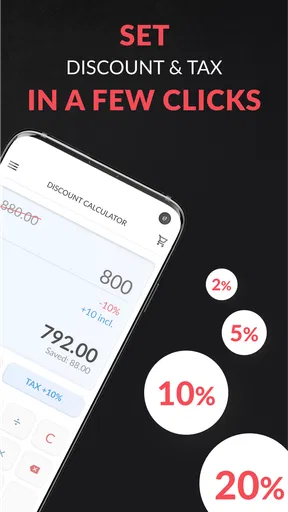
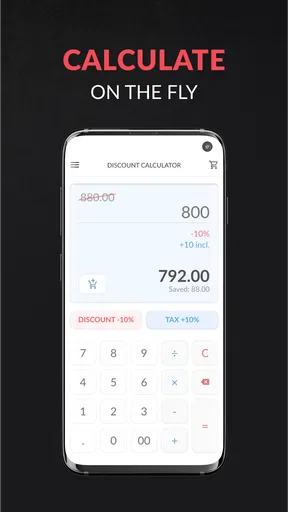
First things first, let’s talk about the user interface. It’s clean, straightforward, and doesn’t overwhelm you with unnecessary options. As soon as I fired up the app, I was greeted with a simple layout that made inputting numbers a breeze. No fumbling around trying to find the right buttons, which is a relief, especially if you're in a hurry at the checkout line.
The app allows you to enter the original price, the discount percentage, and any tax rate you need to consider. With a quick tap, it spits out the final price you’ll end up paying. It's like having a math-savvy buddy in your pocket, ready to help you make smart spending decisions. Discount and Tax Percentage Calculator nails the basics, which is perfect if you just want quick answers without any hassle.
Where a quick calculation can go wrong
The main source of friction with a discount-and-tax calculator is usually the information going in, not the arithmetic. A sale label may advertise a percentage off only selected products, or a retailer may calculate a promotion at the register rather than against the shelf price. Before trusting the result, I check that I am using the eligible item’s actual starting price and the discount that applies to it.
It also helps to be clear about what the displayed result represents. A quick estimate is useful for deciding whether to keep browsing or to compare another offer, but it is not a substitute for the final amount shown at checkout. Store rules, item eligibility and the way a promotion is applied can affect the receipt. I use the app to make a more informed decision, not to argue that a till must match my calculation to the cent.
A practical habit is to enter one offer at a time and read the result before changing any numbers. If I am comparing two products, I note each item’s base price and promotion separately rather than trying to remember a chain of edits. That small pause reduces the chance of carrying one product’s discount into the next calculation.
Setup checks before you rely on the result
There is little setup involved for the basic task: I need the price, the discount rate and a tax rate that makes sense for the purchase. The tricky part is choosing the right tax figure. Rates can differ by location and by the kind of purchase, so I do not assume that a rate I used on a previous trip is still appropriate. If I am unsure, I check the rate that applies where I am buying before treating the total as dependable.
Worth Reading Before You Choose

EA SPORTS FC Mobile 26 Is a Bigger Football Game, but It Takes Time

Flipboard Shows What News Apps Must Do Beyond the Feed

Switching to Android Auto Means Rethinking Your Driving Routine

Google Calendar Makes a Crowded Week Easier to Manage

Ludo King Makes the Most of the Minutes Between Plans

Baby Panda World Brings Quick Play to Modern Phones, but Its Game Library Feels Busy
That matters particularly when travelling. A custom rate can make a rough comparison more useful, but it does not automatically account for local exceptions or special treatment of particular goods. I would use the calculator to estimate an ordinary purchase and leave any unusual tax situation to a more authoritative source or the retailer’s checkout total.
For a first run, I recommend testing a simple example with figures you can verify mentally. Confirm that the starting price and percentage are entered in the intended fields, then compare the output with your own rough calculation. This is not busywork: it gives you a feel for the sequence and helps catch a misplaced decimal or a percentage copied from the wrong tag before you are relying on the answer in a crowded shop.
Recovering from a mistaken entry
If a result looks implausible, I do not keep tapping at random. I pause, recheck the original price, discount and tax rate, and correct the specific value that is wrong. A low-looking total might come from entering the sale price as the original price and then applying the discount again; a high-looking one may simply reflect a tax rate that does not fit the purchase. Starting over with a clean set of figures is often quicker than trying to reconstruct several changes.
For price comparisons, a useful workflow is to treat each offer as a separate scenario. Write down or remember the product price and promotion, calculate that offer, then move to the next one and verify its inputs afresh. The published review of the app describes switching between saved calculations, which can help with side-by-side comparisons; I would still label the scenarios in my notes if the products or stores are easy to confuse. The number alone cannot tell you whether two offers cover the same quantity, model or set of conditions.
If the app seems not to respond as expected, I first check whether the figures were entered and confirmed as intended, then try the calculation again without distractions. If the issue persists, closing and reopening the app is a reasonable general troubleshooting step. I would avoid assuming the calculator is wrong until I have ruled out an input mistake or a promotion that does not apply as broadly as its sign suggests.
Customization and flexibility
Now, what if you’re shopping internationally and dealing with different tax rates? No problem. The app lets you set custom tax rates, which is super handy. Whether you’re vacationing in Europe or hopping stateside, just adjust the tax rate to fit your location, and you're good to go. I found this especially useful when planning my overseas shopping spree.
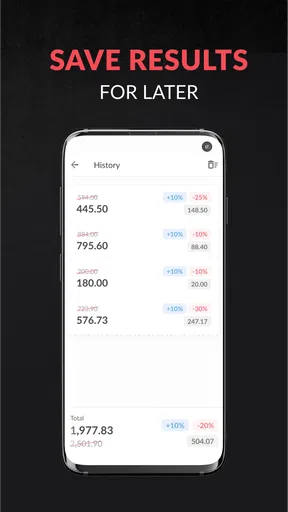
Additionally, if you’re someone who loves comparing prices—say, checking if that online deal really beats the in-store price—you’ll appreciate the app’s ability to save your calculations. You can quickly switch among different scenarios, which is a feature I didn't know I needed until I used it. It's like having a price comparison tool right at your fingertips.
One non-obvious way I would use that flexibility is to compare the same item under different assumptions without mentally recalculating from scratch. For example, I can check a current offer against a second discount scenario, then separately account for the tax rate where I expect to buy. The important trade-off is that a calculator only compares the numbers I provide: delivery charges, membership conditions, bundle contents or return terms still need their own check.
For an everyday example, imagine I am choosing between a jacket on sale in a shop and the same jacket online. I enter the shop’s marked price and advertised discount, then use the relevant tax rate to estimate what I would pay there. I repeat the process for the online offer using its own starting price and promotion. That quickly tells me whether the apparent bargain is still appealing after tax, while reminding me to inspect shipping and product details separately before choosing.
Performance and reliability
Let’s talk about speed. The app runs smoothly without hiccups, which I tested by entering a variety of complex calculations. It handled everything like a champ. Even when my phone decided to throw a few notifications my way, the app stayed responsive and didn’t crash. That’s a win in my book, especially when you’re on the go.
It's also worth noting that the app doesn’t bombard you with ads or prompts to upgrade, which is a breath of fresh air. It does what it says on the tin—nothing more, nothing less. For an app focused on functionality, that’s a major plus.
As a shopping utility from Digitalchemy, LLC, it sits in a narrow but useful space: a faster, more focused alternative to opening a general calculator and working through the percentage steps yourself. A phone’s built-in calculator is perfectly adequate if you are comfortable doing that arithmetic, and a spreadsheet is better if you want to track many purchases over time. This app makes more sense when the question is immediate—“What might this cost after the discount and tax?”—and I want to avoid doing the same calculation manually in a queue.
It is free to download, is rated for Everyone, and has a 4.9 average from around 13 thousand ratings, with more than 500 thousand installs. Those figures suggest it has found an audience, but they do not change the practical limitation: it is a calculator, not a shopping comparison service. The app’s in-app purchases are priced at $0.99 per item, so I would check the purchase details in the app if an optional paid item matters to me rather than assuming every extra is included. Its release date is November 20, 2012, which makes it an established utility rather than a new shopping trend.
When another tool is a better fit
I would skip this app if I mainly need a complete shopping list, a record of household spending, price alerts or a way to verify a complex receipt. Those jobs call for a dedicated budgeting, comparison or retailer tool. It is also not my choice when a purchase depends on several stacked promotions, exclusions or special tax rules that need careful interpretation. In those cases, I check the retailer’s terms and final checkout amount instead of treating a quick estimate as definitive.
For occasional shopping, a built-in calculator may be enough if I only need one simple percentage. The dedicated app earns its place when I repeat discount-and-tax checks and want the steps gathered into one focused task. Its value is convenience, not a guarantee that every advertised offer is comparable or that every final charge has been included.
Is It Worth the Download?
So, should you download the app? If you’re someone who frequently finds themselves second-guessing their math skills at the store, then absolutely. It’s a straightforward, no-frills app that simplifies your shopping experience. Whether you’re a frequent traveler or just someone looking to save a few bucks, this app is a helpful companion.
Overall, this app doesn’t try to reinvent the wheel, and that’s exactly what makes it so effective. It’s reliable, easy to use, and does exactly what it promises. So, next time you’re out shopping and want to ensure you’re getting the best deal, give this app a shot. Trust me, your wallet will thank you!
My recommendation is strongest for people who regularly compare sale prices in person and want a quick estimate without doing percentage arithmetic in their heads. I would keep the tax rate and promotion details in view, use separate calculations for separate offers, and treat the final register total as the answer for the actual purchase. With those sensible limits, it is a handy little shopping aid; if you need broader price research or record-keeping, a different kind of tool will serve you better.
Pros
- Simple user interface for quick calculations
- Customizable tax and discount rates
- Supports multiple currencies
- Offline mode available
- Lightweight and fast performance
Cons
- Limited advanced features for professionals
- No option for saving past calculations
- Ads can be intrusive at times
- No cloud sync for data backup
- Requires manual input for each calculation
FAQs for Discount and tax percentage ca
What is the main purpose of the Discount and Tax Percentage Calculator app?
The Discount and Tax Percentage Calculator app is designed to help users easily calculate discounts and tax percentages on various purchases. It simplifies the process of determining the final price after applying discounts and taxes, making it an essential tool for shoppers who want to manage their budgets effectively.
Is the app available on both Android and iOS platforms?
Yes, the app is available for download on both Android and iOS platforms. Users can find and install it through the Google Play Store for Android devices and the Apple App Store for iOS devices, ensuring compatibility with a wide range of smartphones and tablets.
Does the app require an internet connection to function?
No, the Discount and Tax Percentage Calculator app doesn't require an internet connection to perform calculations. Users can use the app offline to calculate discounts and taxes, making it convenient for use even in areas with limited internet access.
Are there any in-app purchases or ads within the app?
The app includes ads to support its free version. However, users have the option to make in-app purchases to remove ads and enjoy an ad-free experience. These purchases help improve user experience and support the ongoing development of the app.
How user-friendly is the app for someone who isn't tech-savvy?
The app is designed with a user-friendly interface that caters to all users, including those who aren't tech-savvy. It features simple input fields and clear instructions, ensuring that anyone can easily navigate and use the app to perform discount and tax calculations without any hassle.


